Let AI use your in-house MCP server or database without opening a single inbound port. You choose which tools AI can see, the allowlist stays inside your company, and the relay runs on servers in Japan. "We want AI to use our internal data, but opening the door makes us nervous" — this solves exactly that.

Many teams get as far as standing up an MCP server, then stall at "making it reachable from an outside AI". The reasons are usually these three.
Reaching internal systems from a cloud AI normally means opening an inbound port or setting up a new VPN. Both need heavy sign-off from the network team and take time.
A generic tunnel only passes a port. If your MCP server has 20 tools, all 20 — including delete and update — become visible to the outside AI.
If the decision about which tools AI may use lives on the cloud side, it won't pass internal review. The source of truth has to be in-house, and there has to be a record.
An agent inside your network opens a single outbound tunnel, and WireCanal stands guard in front of it. To the AI it looks like a remote MCP server, but only calls to allowed tools get through.
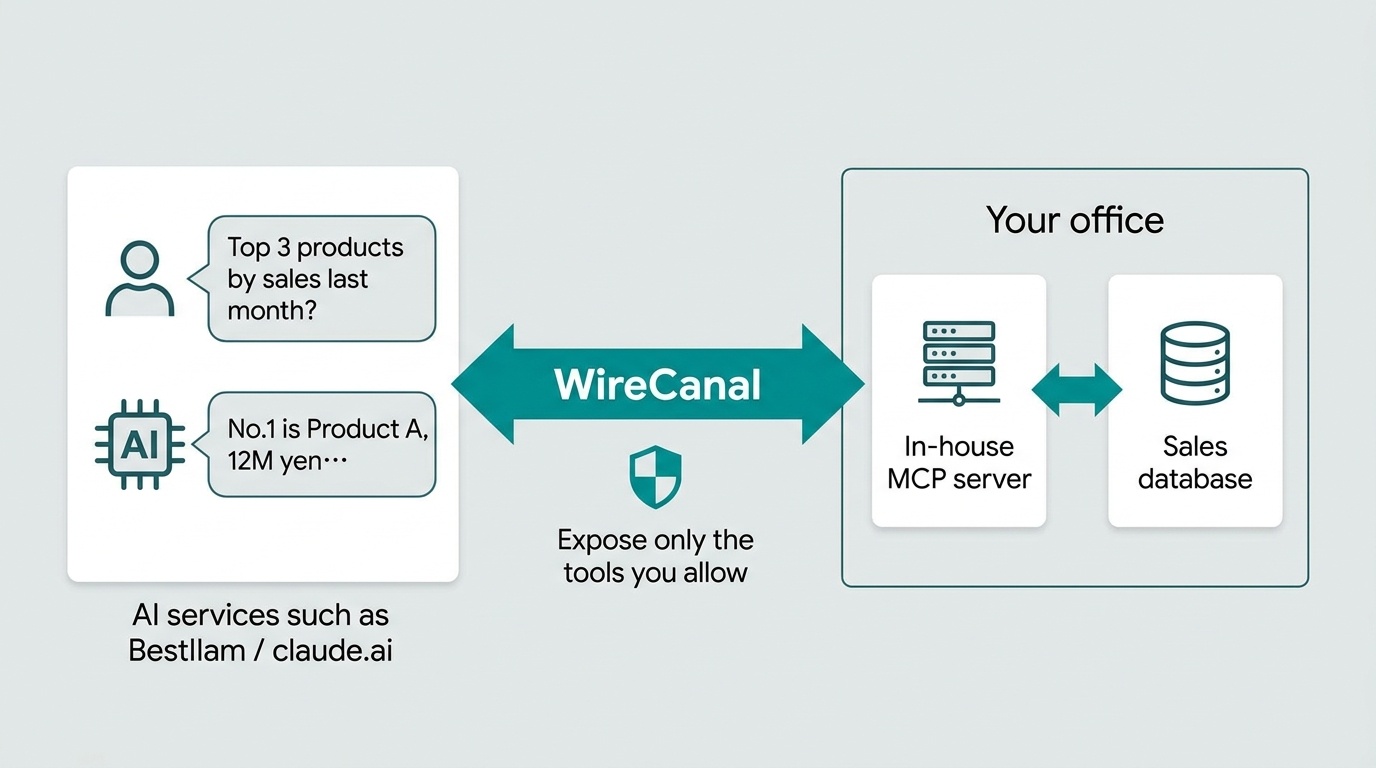
How safe an AI integration is comes down to whether your company controls these three boundaries. WireCanal keeps all three in your hands.
Every time an AI connects, it passes WireCanal's approval screen, and only the canal owner can approve. Connect your organization's IdP such as Google Workspace to restrict use to members of an allowed domain.
Default deny. Only allowed tools can be called, and denied tools don't even appear in the list. The allowlist in your local wirecanal.json is the single source of truth and cannot be rewritten from the cloud (two-key).
The relay runs on servers in Japan, TLS end to end, and traffic bodies are not stored. The agent never connects anywhere except the configured destination, so the tunnel can't be repurposed as a corridor into your network.
Three ways to make an in-house MCP server usable from AI, compared on the entry point, what is visible, who controls permissions, authentication with AI, and effort.
| Criteria | Build it yourself (VPN / reverse proxy) | Generic tunnel service | WireCanal |
|---|---|---|---|
| Entry into your network | Requires opening an inbound port or a new VPN. Network-team sign-off and work. | No inbound port (outbound connection). | No inbound port and no new VPN. The agent simply connects outbound on 443. |
| Tools visible to AI | Depends on the MCP server. Narrowing it means modifying the server. | Passes a port, so every tool on the MCP server is visible. | Only allowed tools. Denied tools don't appear in tools/list. |
| Where the allowlist lives | In-house (but the mechanism is home-made). | No such mechanism. | Your local config file is the single source of truth; the cloud cannot change it (two-key). |
| Authentication with AI services (OAuth) | Run your own authorization server. | Provide it yourself. | Built in. Paste the URL for Claude and ChatGPT; clients auto-issued for Bestllam and Grok. |
| Restricting users to your organization | Implement IdP integration yourself. | No such mechanism. | Connect an organization IdP such as Google Workspace and restrict to allowed-domain members. |
| Record of who used it, when, from where | Provide it yourself. | Depends on the service. | Per-canal access log, available in the dashboard, via API and as CSV. |
| Time to deploy | Often weeks of design, build and review. | Short, but everything above still has to be arranged separately. | Create a canal → install the agent → paste the URL into the AI. About 10 minutes, no changes to the existing MCP server. |
"Generic tunnel service" describes the general nature of services that expose a port or host to the internet. WireCanal's column matches what is stated on the MCP & AI, Security and Pricing pages.
In the dashboard, choose the "MCP" type and answer "Which AI will use this?". You get a remote MCP server URL (for example https://<hostname>/mcp) and the connection settings for that AI.
Put the agent on the machine running the MCP server (or one on the same network) and list the tools you want to expose under tools.allow in wirecanal.json. Anything not listed is denied and hidden from the list. Install commands are in the Setup Guide.
Paste the canal URL into a Claude custom connector or a ChatGPT developer-mode connector, and WireCanal's approval screen appears. Once the owner approves, you're connected. Step-by-step guides with real screens: Claude, ChatGPT, Grok.
The Free plan has no time limit and includes one canal, MCP integration and all eight access protections. No credit card required. For department- or team-wide use, talk to us about the Enterprise Plan with seat-based licensing and invoice payment.
No. AI connects to your in-house MCP server, and it reaches the database only through that server's tools. WireCanal shows AI only the tools you allow, so what AI can touch is limited to what your company decided.
No. WireCanal does not record request or response bodies; it pipes them through as-is over TLS end to end. The per-canal access log records who, when, from where, and the result. Tool-call arguments and results are exchanged between you and the AI service you use.
Verified with Bestllam, Claude (claude.ai), ChatGPT and Grok. For Claude and ChatGPT you just paste the canal URL and OAuth is configured automatically. Claude Code, Gemini CLI and similar tools can be combined by issuing an access key.
No. The only allowlist that decides which tools are visible is the wirecanal.json file on your own machine. It cannot be rewritten from WireCanal's dashboard or public servers. If the allowlist is empty, every tool starts out denied even after connecting.
Yes. Connect your organization's identity provider (IdP) such as Google Workspace, and only members of the allowed domain can use the canal from AI. When an account is disabled, for example when someone leaves, their access stops too. See the organization IdP guide.
MCP integration is available on every plan. You can try one canal for free on the Free plan, which has no time limit. For department- or team-wide use, the Enterprise Plan offers seat-based licensing and invoice payment.
Sign-up is free. No credit card required — create your first canal right now.
 WireCanal