Reach your internal web systems, RDP, SSH, databases and local development servers securely from outside. A single outbound tunnel from inside your network means nothing changes on your router or firewall. Eight access protections narrow the entrance, and the relay runs on servers in Japan.

Web screens and TCP services such as RDP and SSH all ride on the same single tunnel.
Give a web app or API under development an HTTPS address for external webhooks, checks from your phone, or reviews with people outside. Certificates are issued automatically.
Use business screens and internal APIs on your office network from a trip or from home. Layer source-IP restriction or BASIC auth to limit them to the people who need them.
RDP into your office or home PC from outside. Keep it paused and resume from your phone only when you need it (TCP canal, Pro and above).
SSH into on-site servers or Linux boards such as a Raspberry Pi without opening an inbound port. SSH's own encryption protects the path.
A connection endpoint for PostgreSQL / MySQL that only your site's fixed IP can reach — for BI tools or external analytics environments.
Web screens, APIs and SSH on a Raspberry Pi or small Linux board, from anywhere. 32- and 64-bit ARM supported (IoT devices).
An agent inside your network connects outbound to WireCanal's servers in Japan, and users' requests travel through that single connection into your network. To users it looks like an ordinary URL or port, but not a single inbound port is open on your side.
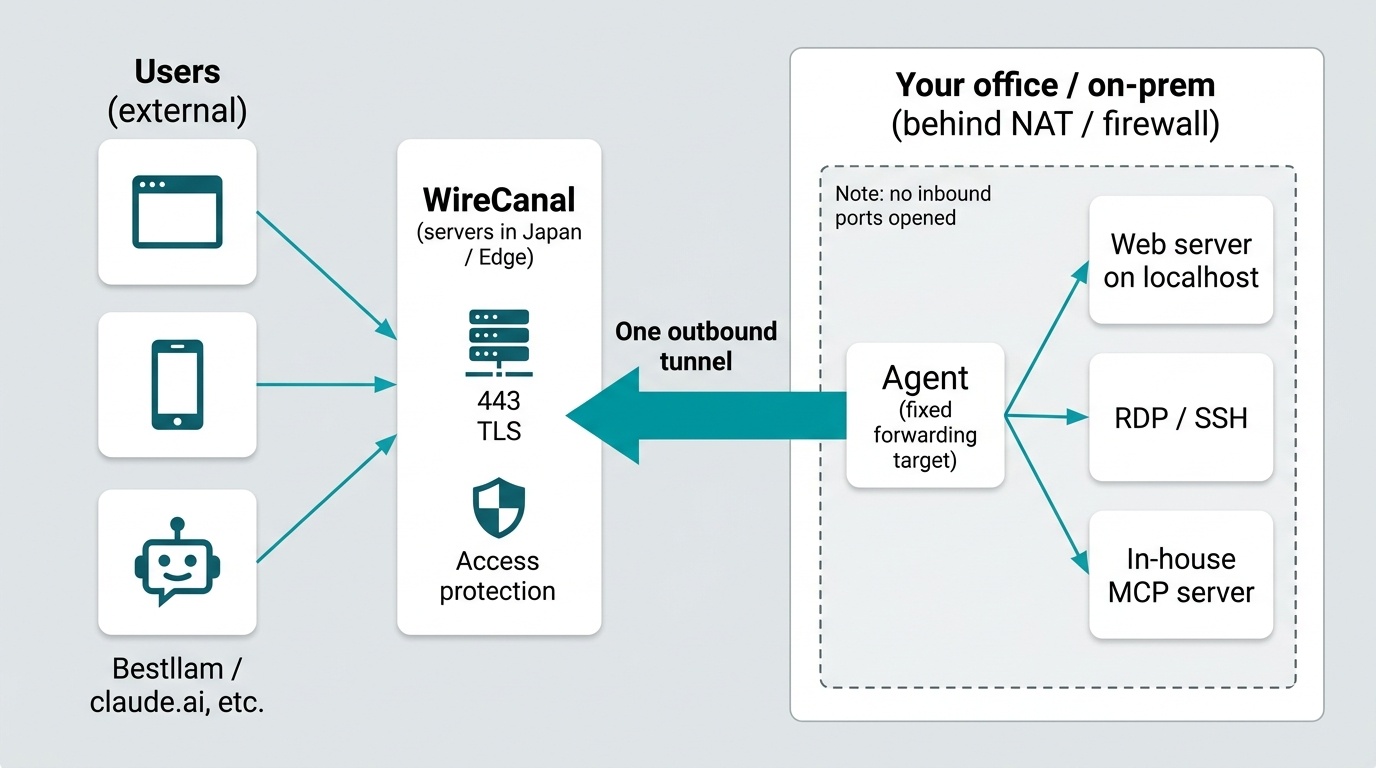
"Reachable from outside" and "reachable by anyone" are different things. Each canal can have the following eight access protections on its public entrance. All eight are available on every plan, including Free.
The agent never connects anywhere except the destination written in its config file (for example 127.0.0.1:3389). By design, the tunnel cannot be repurposed as a corridor into your whole network. Whenever a decision is uncertain, it fails closed. Details on the Security page.
The three common ways to make an internal system reachable from outside, compared on preparation, narrowing access, records, and how you turn it off.
| Criteria | Port forwarding (a hole in the router) | New VPN | WireCanal |
|---|---|---|---|
| Router / firewall changes | Required: open an inbound port and set the forwarding target. | Required: install a VPN appliance or server and open an inbound port. | None. The agent connects outbound on 443. |
| Preparation on the user's side | None (just share the URL or IP). | Distribute, configure and provision a VPN client on every device. | None. Use a browser or RDP client as usual. |
| Narrowing who can reach it | Depends on the router; IP restriction at best. | Once connected, users often reach the whole internal network. | Per canal: IP, country, authentication, schedule and path. Destination fixed to one place. |
| Record of who used it and when | Provided by the exposed system itself. | VPN connection log (not per system). | Per-canal access log, available in the dashboard, via API and as CSV. |
| HTTPS and certificates | Obtain and renew certificates yourself. | VPN encryption; HTTPS for the system itself is separate. | Certificates issued automatically. TLS end to end. |
| Turning it off when not in use | Revert the router settings. | Disable accounts or stop the appliance. | Pause the canal; resume in seconds. Scheduled availability can automate it. |
| Time to deploy | The setting itself is quick, but internal approval tends to take long. | Selecting, installing and rolling out to users often takes weeks. | Create a canal → install the agent → run. About 10 minutes, with no changes to existing systems. |
WireCanal's column matches what is stated on the Tunnel, Security, Pricing and Setup Guide pages. For a comparison with other tunnel services, see the comparison page.
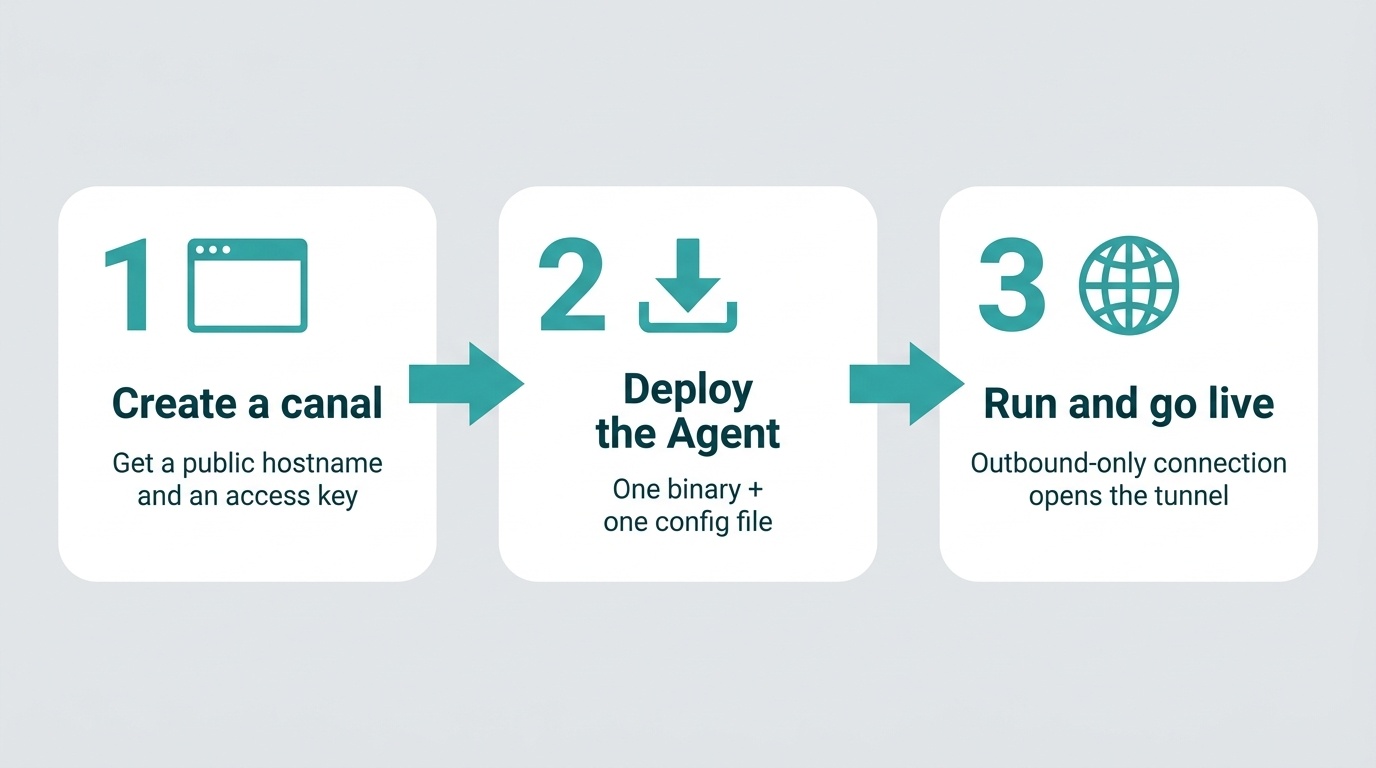
In the dashboard, choose the type (HTTP / TCP) and the destination (for example localhost:8080 or 127.0.0.1:3389). You get a public hostname (a port for TCP) and an access key.
irm https://download.wirecanal.com/install.ps1 | iexcurl -fsSL https://download.wirecanal.com/install.sh | shThe agent is a single static binary with no runtime dependencies, for Windows and Linux (amd64, arm64 and 32-bit ARM).
wirecanal -config wirecanal.json opens the tunnel. From that moment the public hostname reaches your machine. Running it as a service (Windows service, systemd) is covered in the Setup Guide with real screens.
Start with one canal on Free. TCP (RDP, SSH, DB) starts at Pro; custom domains start at Premium.
No time limit. One HTTP canal, all eight access protections and the access log. Start here for localhost or an internal web screen.
Expose any TCP service through a TCP canal. Add IP restriction for an effectively dedicated line. Lite and above can reserve a permanent subdomain of your choice.
Publish on a domain you own (for example app.example.co.jp). Certificates are issued and renewed automatically. For department-wide use, see Enterprise.
Yes. The agent on your internal or local machine simply opens an outbound tunnel on port 443 to WireCanal's servers. No router or firewall changes are needed. Proxy-only environments are supported with a single setting.
A VPN joins a user's device to your internal network and needs a client installed and configured on every device. WireCanal gives a public address to just the system you want to expose, with nothing to prepare on the user's side. You don't have to replace an existing VPN; WireCanal can sit alongside it for the systems you need reachable from outside.
Most of what other tunnel services do (HTTPS publishing, TCP, custom domains, IP restriction and so on) WireCanal can do too. The three differences are: the relay runs on servers in Japan; all eight access protections are available on every plan; and an in-house MCP server can be exposed to AI with only the tools you choose. A side-by-side comparison on use cases, port and VPN requirements, fixed URLs, free tiers, data path and setup length is on the comparison page.
RDP is exposed through a TCP canal (Pro plan and above). Add IP restriction and the public endpoint effectively becomes a dedicated line. You can also keep the canal paused and resume it from the dashboard on your phone only when you need it.
A canal can be paused. The agent's connection and settings are kept while paused, so resuming takes seconds. With the scheduled-availability protection you can also decide in advance which days and hours it is public.
You can state that the relay runs on servers in Japan, that the path is TLS end to end, that traffic bodies are not stored, and that the agent never connects anywhere except its configured destination. Technical questions are welcome through the contact form.
Sign-up is free. No credit card required — create your first canal right now.
 WireCanal